If you run Google Ads campaigns or use Google Analytics 4 with visitors from the European Economic Area, Consent Mode v2 is no longer optional: without its signals, Google cannot use the data for ad personalisation and conversion measurement. The problem is that many implementations look correct but send nothing: the banner appears, the user clicks “Accept”, and no visitor shows up in GA4.
This guide explains what Consent Mode v2 does, the correct order of scripts, how to update consent on acceptance, how Meta Pixel and TikTok fit in and how to test that everything works. The recipe comes from our implementations on maxdev.ro, Praxi and other projects, not from copied documentation. This is not legal advice: for decisions that depend on the GDPR or cookie legislation, consult a specialist.
In short: you set the default consent to “denied” before gtag.js loads, then send “granted” when the user accepts, and you re-send the GA4 configuration at that moment. Consent Mode does not replace the cookie banner and does not retroactively resend the visit already sent under “denied”. Test in the Network panel and in GA4 Realtime, not just in code.
What Consent Mode v2 is and why it matters
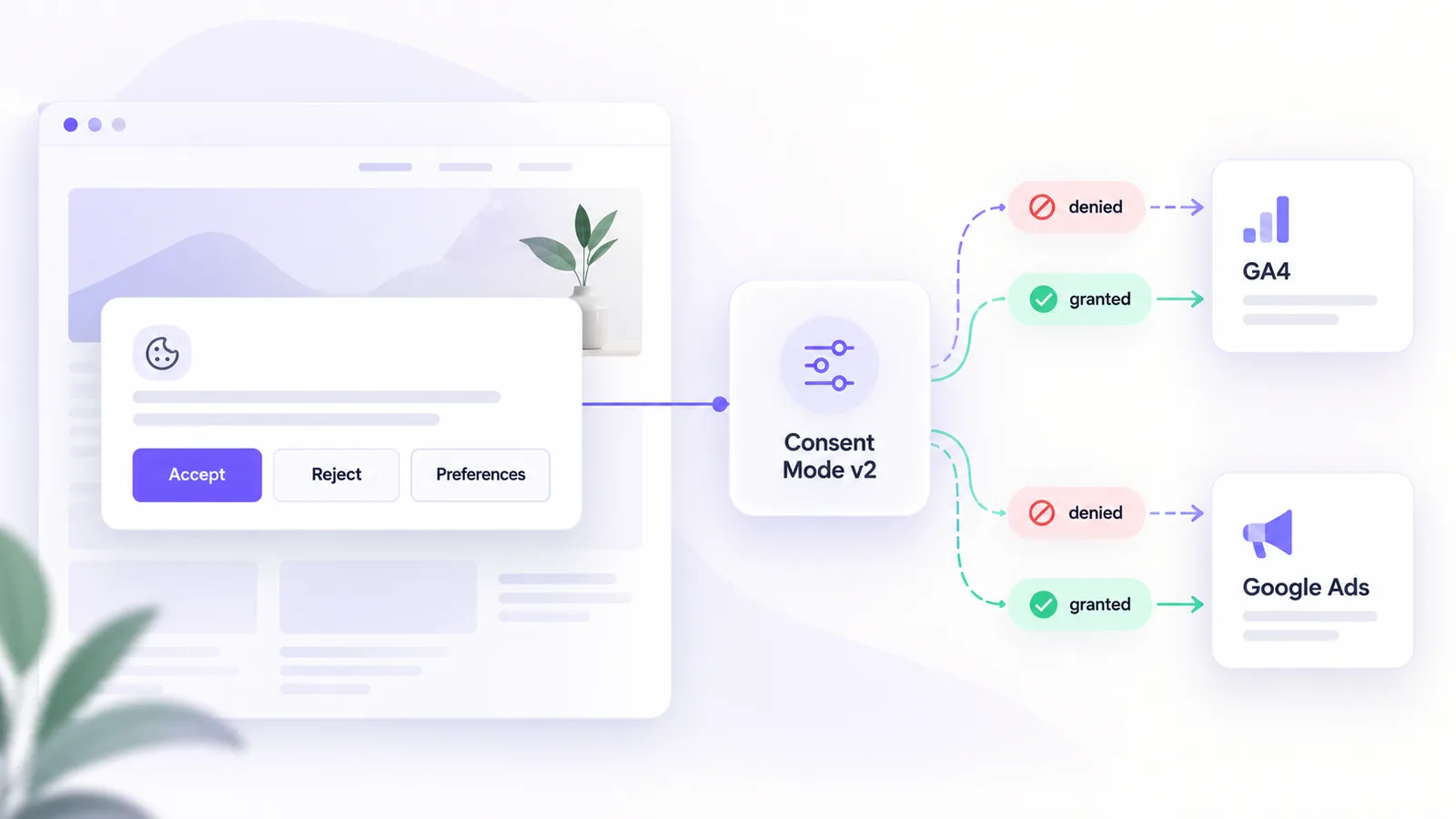
Consent Mode is the mechanism through which your site tells Google’s tags what they may do depending on the visitor’s choice. Version 2 added two signals for advertising, ad_user_data and ad_personalization, which are required for users in the European Economic Area for ad personalisation and conversion measurement. Without them, remarketing and part of the measurement do not work as you expect.
The key point: Consent Mode is not a banner. The banner collects the user’s choice; Consent Mode passes that choice to Google. You need both, and the banner text has to be consistent with your cookie policy.
The six signals
| Signal | What it controls | Usual default |
|---|---|---|
| analytics_storage | Analytics cookies (GA4) | denied |
| ad_storage | Advertising cookies | denied |
| ad_user_data | Sending user data to Google for advertising | denied |
| ad_personalization | Ad personalisation (remarketing) | denied |
| functionality_storage | Site functions (preferences) | granted |
| security_storage | Security and fraud prevention | granted |
The first four are the ones that change when the user agrees. The last two are, as a rule, strictly necessary, so they stay granted.
Basic mode or advanced mode
There are two ways to implement it. In basic mode, Google tags do not load at all until the user accepts; you send nothing before consent. In advanced mode, the tags load from the start with the default consent set to “denied” and can send cookieless signals, which Google uses for modelling. The choice between them depends on your privacy policy and on what your legal adviser says, not on a technical preference. The implementation below follows advanced mode, which is exactly the variant we use.
The correct order of scripts
The rule that breaks most implementations: the default consent must be set before gtag.js. If gtag.js loads first, the first hit leaves without your rules.
<script>
  window.dataLayer = window.dataLayer || [];
  function gtag() { dataLayer.push(arguments); }

  gtag('consent', 'default', {
    analytics_storage: 'denied',
    ad_storage: 'denied',
    ad_user_data: 'denied',
    ad_personalization: 'denied',
    functionality_storage: 'granted',
    security_storage: 'granted',
    wait_for_update: 500
  });
</script>
<script async src="https://www.googletagmanager.com/gtag/js?id=G-XXXXXXXXXX"></script>
<script>
  gtag('js', new Date());
  gtag('config', 'G-XXXXXXXXXX');
</script>
The wait_for_update: 500 parameter gives the banner 500 milliseconds to restore a consent already saved, on later visits. That is enough for automatic restoration, but not for the active decision of a new user, who needs much longer to read and click. This is why the trap in the next section appears.
Updating on consent: the trap that hides visitors
When the user clicks “Accept”, you send the update. But you have a problem: the automatic hit from the page load has already left, under “denied”, long before the click, and Consent Mode does not resend old hits; it only applies to the future. The result: the visit does not show up in GA4. The solution, documented by Google for this case, is to re-send the configuration after the update:
function acceptAll() {
  gtag('consent', 'update', {
    analytics_storage: 'granted',
    ad_storage: 'granted',
    ad_user_data: 'granted',
    ad_personalization: 'granted'
  });
  // re-send measurement, otherwise the visit already sent under "denied" does not appear in GA4
  gtag('config', 'G-XXXXXXXXXX');
}
Two details we verified in practice. First: a manually sent gtag('event', 'page_view') does not work, because gtag.js treats it as a duplicate of the page and ignores it; only re-sending config works. Second: call the global gtag function created by the script in <head>, not a wrapper of your own that does dataLayer.push manually, because in one project the local version did not work and the global one fixed the problem.
Re-send config only on the transition from “denied” to “granted”, not on every load, otherwise you double the visits. On later visits, with consent already saved, you restore it as soon as the page loads.
Meta Pixel and TikTok
Marketing pixels have their own mechanisms, symmetrical with Google’s. With Meta, you call fbq('consent', 'revoke') before fbq('init', ...) so nothing is sent until consent, and on acceptance you call fbq('consent', 'grant') and re-send PageView manually, because Meta does not deduplicate the way gtag.js does. With TikTok, you call ttq.holdConsent() before ttq.load(...), then ttq.grantConsent() or ttq.revokeConsent() after the user’s choice. If you do not keep pixels under consent, the banner says one thing and the site does another.
How to test
- Open the console and check
typeof window.gtag: it must be"function"before you click “Accept”. - Inspect
dataLayerand look for theconsent defaultcommand as the first item, before any other command. - Open the Network tab, filter on
collectand click “Accept”: a new request should appear immediately. Thegcsparameter in the request shows the consent state sent to Google; usually a value like G100 means denied and G111 means granted for analytics and ads. - Check GA4 Realtime after accepting and, if you need details, DebugView.
- Test refusal: click “Necessary only” and check that no analytics or advertising cookies appear and that no requests go to the pixels.
- Test a return visit: reload the page with the consent saved and check that it is restored from the first load.
If everything passes and GA4 still shows no visitors, the problem is not in the code: look at the property configuration (internal traffic filters, the data stream).
Common mistakes
- gtag.js loads before the default consent.
ad_user_dataandad_personalizationare missing, so the implementation is really version 1.- You re-send
page_viewmanually instead ofconfig, and nothing shows up. - The banner does not save the choice, and the user sees it on every page.
- Marketing pixels load before consent.
- Several layouts, one implementation. If the application has different areas (public site and account), each must include the banner and the parameters; at Praxi there were two.
- The banner promises something different from what the site does. The text must match what actually happens.
What remains your job
Consent Mode solves the technical part of passing consent. It does not solve the banner text, the cookie policy, the categories you offer or how you keep proof of the choice. If you are starting a paid campaign, setting up measurement correctly makes the difference between usable and incomplete data, and at site level a technical SEO audit checks tags, scripts and indexing together.
Frequently asked questions
Does Consent Mode v2 replace the cookie banner?
No. The banner collects the user’s choice; Consent Mode only passes it to Google. You need both.
Why do no visitors show up in GA4 after they accept cookies?
Because the load hit left under “denied”, and the update does not resend it. Re-send gtag('config', ID) at the transition to “granted”.
What is the difference between basic and advanced mode?
In basic mode no tag loads until consent. In advanced mode tags load and send cookieless signals before consent. The choice is made with legal advice.
Do I need to change anything for Meta Pixel?
Yes. The Meta pixel has its own consent mechanism (revoke before init, then grant), and TikTok does too, with holdConsent and grantConsent.
How do I know whether my implementation works?
Check the requests to collect and the gcs parameter in the Network tab, then GA4 Realtime. If a new request appears immediately after “Accept” and the visit is visible, it works.
If you want us to check measurement and consent on your site together, describe your situation and we will come back with a plan.